In this page
- Three numbers to match every night
- The drawer sum
- Worked example: cash over, card short
- The terminal does not read the POS, and the POS does not read the terminal
- Common causes of a difference
- Delivery app sales
- A restaurant with more than one POS
- How dots POS closes the day
- The daily close sheet to download
- What it costs
- Questions
In short
- The cash expected in the drawer is the opening float, plus net cash sales, plus what was paid in, less what was paid out.
- A cash difference matched by an opposite difference of the same amount on card usually means a payment recorded under the wrong method, not missing money.
- Record each delivery app’s orders under its own payment method, so you can match its sales with what it pays you.
Three numbers to match every night
- The cash in the drawer.
- The card terminal’s total.
- Delivery app sales.
A restaurant has more payment methods and more devices than a coffee shop, so match each number on its own.
The drawer sum
In dots POS, the expected cash in the drawer is the opening float, plus net cash sales after cash refunds, plus what you paid into the drawer, less what you paid out of it. The difference is what you counted less what was expected.
Worked example: cash over, card short
The figures are made up, so put your own night’s figures in their place.
| Line | SAR |
|---|---|
| Opening float | 500 |
| Net cash sales | 2,340 |
| Paid out of the drawer (ice from a supplier) | 60 |
| Expected in the drawer | 2,780 |
| Counted | 2,830 |
| Cash difference | Over by 50 |
| Card sales on the POS | 4,230 |
| Card terminal total | 4,180 |
| Card difference | Terminal 50 lower |
Expected is 500 + 2,340 − 60 = 2,780, and 2,830 was counted, so cash is 50 over. On card, the POS recorded 4,230 and the terminal says 4,180, so the terminal is 50 lower. The reading: a 50 bill was paid in cash and recorded as card. All the money is there; only the record is wrong.
The terminal does not read the POS, and the POS does not read the terminal
- dots POS is not connected to the card terminal: the cashier records each card payment.
- You write the card terminal’s total when the shift opens, and its total now when it closes if you wrote it at the open, and match it with the card sales on the POS.
Common causes of a difference
- A payment recorded under the wrong method.
- Cash paid out for a purchase and not recorded.
- Wrong change given to a guest.
- A declined card payment recorded as paid.
- A sale on the branch’s second POS, which has its own shift.
In dots POS a cash difference never stops the close; it is recorded as it is.
Delivery app sales
- App orders do not arrive by themselves: the cashier records each under that app’s payment method.
- They show in their own column at close of day, and the day report gives each app’s sales.
- Compare each app’s sales in the day report with what it pays you for the same day, and check any difference against your contract with it.
A restaurant with more than one POS
- Each device opens and closes its own shift, and the day closes with the branch’s last device.
- The X report shows the shift’s sales so far without changing anything.
How dots POS closes the day
- On the Shift tab, tap Count the drawer and write the cash counted; the expected amount shows beside it: Balanced, Over or Short.
- Tap Close shift · Z report.
- On the branch’s last device, tap Close the day and print.
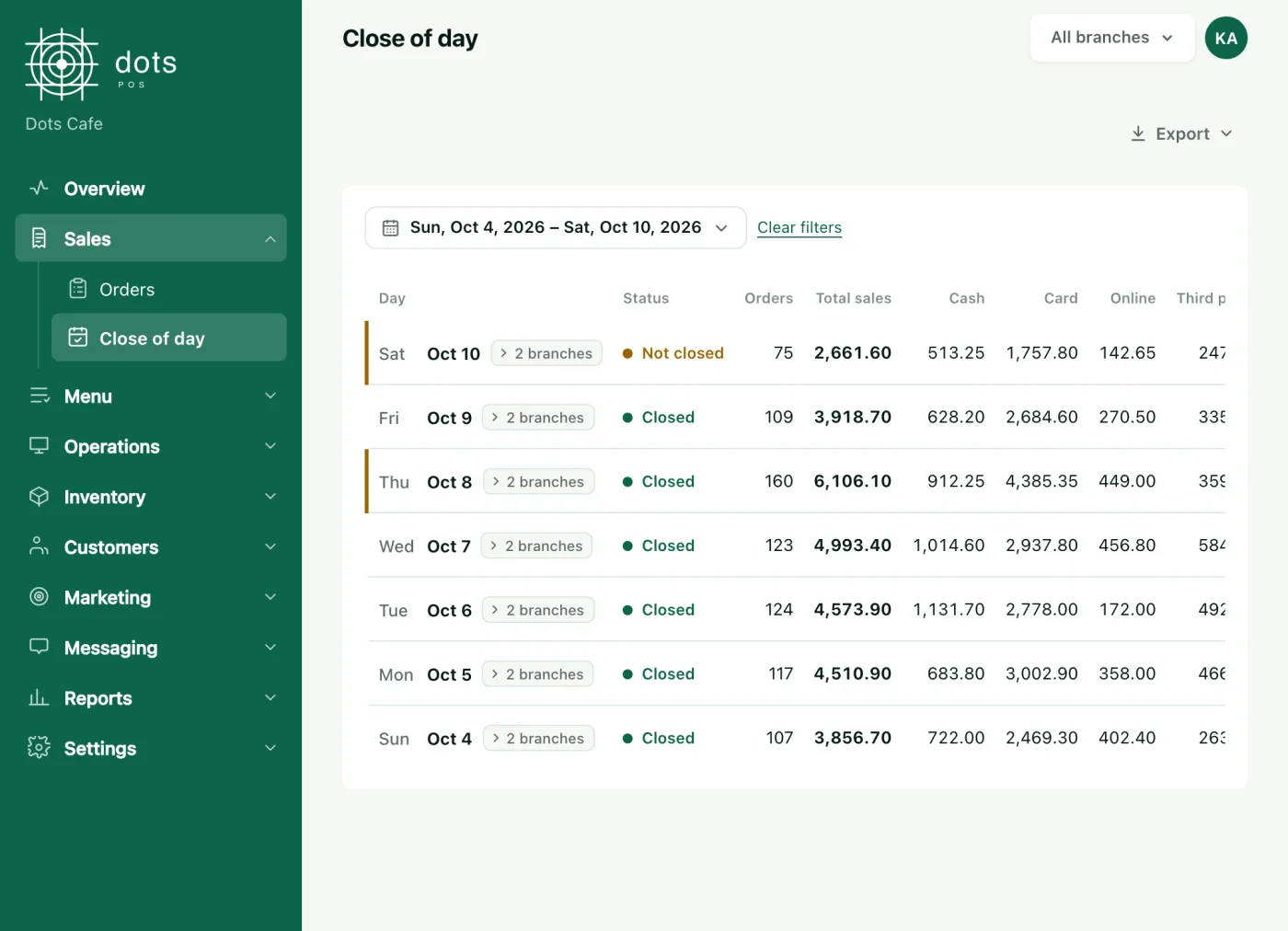
In the dashboard, Sales › Close of day shows each day’s status, orders and sales as cash, card, online and third party. Open a day to see the drawer, expected, counted and the difference, and export the day summary or every payment as an Excel file.
The daily close sheet to download
The sheet has these lines with blank cells for your figures, works out the expected cash and the differences for you, and tells you when the cash and card differences are equal and opposite.
Daily close sheet
An Excel file that works out the expected cash and the differences, and a PDF copy to fill in by hand.
What it costs
Shifts and close of day are in every plan, from the POS plan: SAR 99 a month for the first branch, VAT included, each further branch at half price, and SAR 950 a year for one branch paid yearly.
Questions
What is the difference between the X report and the Z report?
The X report shows the shift’s sales so far and changes nothing. Close shift · Z report closes the shift, and on the branch’s last device it closes the day and prints its report.
I paid a supplier from the drawer; how do I record it?
With Record cash in or out, giving the amount and the reason. It cannot be undone; a mistake is put right by a movement the other way, and staff without Manage shifts need a manager’s code.
Cash is over and card is short by the same amount. Why?
Most likely a payment recorded under the wrong method, as in the worked example.
Do I close the day from the dashboard?
No. The day is closed on the POS; the dashboard is where you review it.
Source: The close of day help article, the food trucks and cloud kitchens pages on the dots site, the shift report in dots POS, and dots POS prices.