In this page
In short
- The best seller is not always the best earner: look at what an item sells and what it leaves you, together.
- Menu engineering puts each item, within its category, in one of four boxes, and each box has a decision.
- In dots POS, the Menu performance page and Ask Dots work it out from your sales and recipes.
Why “best seller” is not enough
Your best seller fills the day, but it is not always what earns you money. An item that sells a lot at a small profit per cup can leave you less than one that sells less at a higher profit.
Menu engineering looks at both together: how much an item sells, and how much each one leaves you after its recipe cost.
What is menu engineering? Four boxes
A well-known method in restaurants, Kasavana and Smith’s, puts each item, within its category, in one of four boxes:
- Star: sells a lot and earns a lot. Keep it as it is.
- Workhorse: sells a lot and earns little. Raise its price or cut its cost.
- Puzzle: sells little and earns a lot. Promote it.
- Weak: sells little and earns little. Think about taking it off.
How to work it out: an example
Popularity: divide what the category sold by the number of its items that sold in the period; that is each item’s share if they sold evenly. An item “sells a lot” when it sells at least 70% of that.
Profit: the item’s price before VAT and after discounts, less its recipe cost. The profit is “high” when it is at or above the category’s average, weighted by how many of each item sold.
| Item | Sold | Price | Recipe cost | Profit per cup | Box |
|---|---|---|---|---|---|
| Latte | 400 | 16.00 | 4.00 | 12.00 | Star |
| Americano | 300 | 11.00 | 1.50 | 9.50 | Workhorse |
| Spanish latte | 250 | 18.00 | 4.50 | 13.50 | Star |
| Saffron latte | 60 | 22.00 | 6.00 | 16.00 | Puzzle |
| Hot chocolate | 50 | 14.00 | 5.00 | 9.00 | Weak |
The category sold 1,060 cups, so each item’s even share is 212 cups, and 70% of that is 148.4: the latte, Americano and Spanish latte sell a lot; the saffron latte and hot chocolate sell little.
The weighted average profit is SAR 11.73 a cup: the latte, Spanish latte and saffron latte are above it, the Americano and hot chocolate below. So the Americano is a workhorse, selling a lot and earning below average; the saffron latte is a puzzle worth promoting; and the hot chocolate is weak.
Category by category, every recipe costed
- Drinks are compared with drinks and desserts with desserts, never with each other.
- A category is worked out only when every item sold in it and still on the menu has a whole cost: from its recipe, or from the stock item it is sold as. An item without one is listed so its recipe can be finished.
- A size with no recipe of its own is costed as the item’s recipe times its size, and the page tells you so.
- Paid extras that have a cost count with the item; an extra with no cost stays out until it is given one.
Menu engineering in dots POS
- The Menu performance page on the dashboard puts each item in its box, category by category, for any period up to a year.
- Ask Dots in your own words, “Which items are stars, workhorses, puzzles or weak this month?”, and it answers from the same sums.
- It prepares a plan of changes on one card: a new price, a percent off for a while, or an item first in its category. You edit or untick each step, apply them all with one tap, and can put them back.
- If recipes are missing, Dots drafts them from your own stock for you to check.
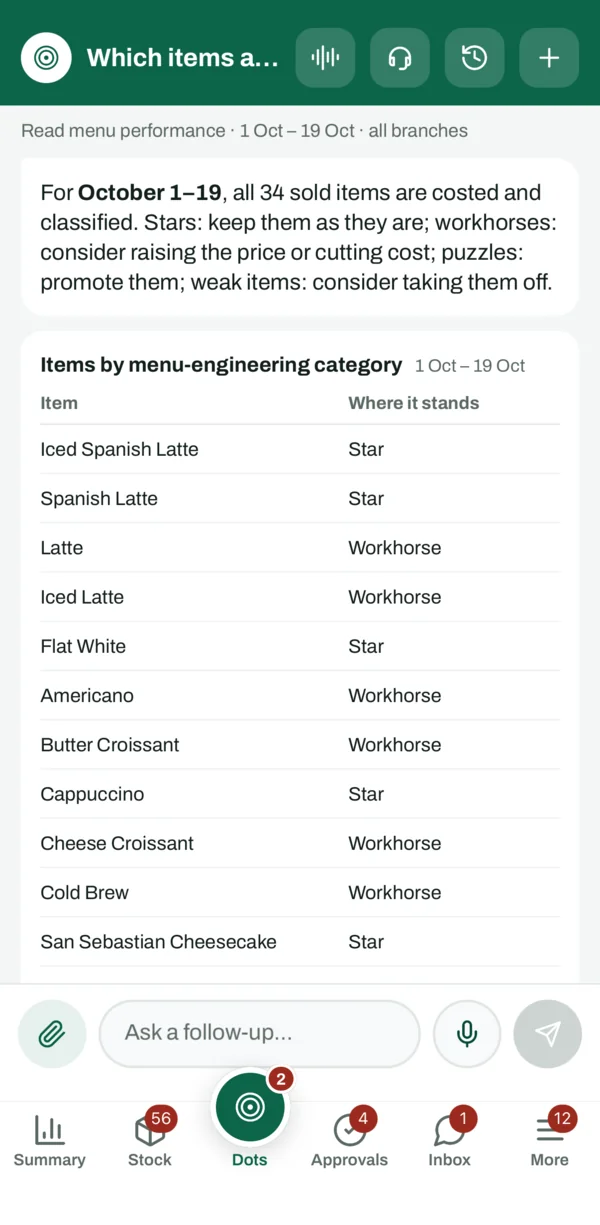
Menu performance, asking Dots about it and the plan of changes are in POS Advanced; item recipes and their cost start from POS+.
What to do next
- Start with your best sellers: finish their recipes first, as they move the figures.
- Look at your workhorses: a slightly higher price, a smaller portion, or a cheaper ingredient.
- Promote your puzzles: a better place on the menu, or an offer for a while.
- Decide on the weak ones: take them off, or keep them if guests come for them.
- Work it out again in a month, and compare.
Questions
What is menu engineering?
A method that puts each item, within its category, in one of four boxes by what it sells and what it earns: star, workhorse, puzzle, weak.
Do I need a recipe for every item to do menu engineering?
Every item sold in the category and still on the menu needs a whole cost, from its recipe or from the stock item it is sold as. Until then the category waits, so no box is drawn on a partial average.
Why not compare drinks with desserts?
Their prices and sales are different. Comparing within a category tells you which item is best among its alternatives.
Does Dots change menu prices by itself?
No. It prepares a plan of changes on a card; you edit it, apply it, and can put it back.
Source: The Menu performance page of the dots POS dashboard, and the method as dots POS applies it, checked on 19 October 2026.